
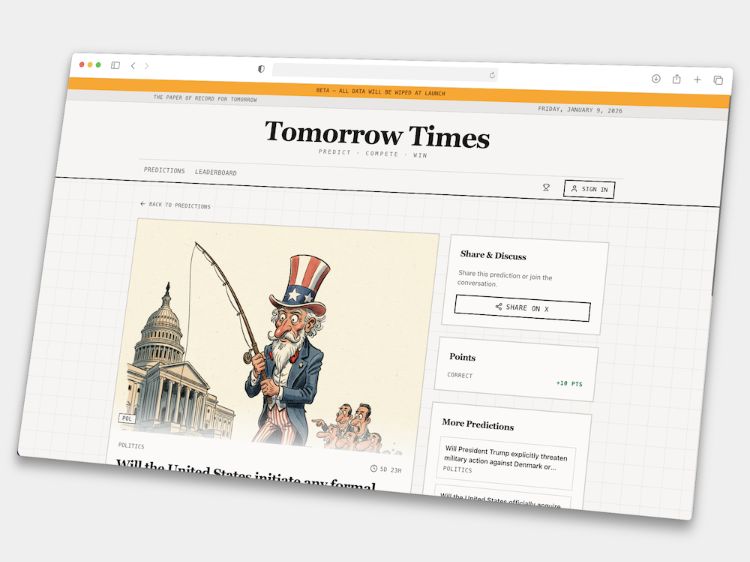
For fifteen years I’ve wanted to build a prediction market meets satirical newspaper. A place where readers could vote on what happens next in the news, wrapped in the irreverent tone of a Private Eye or The Onion.
Last weekend, using AI, I built the whole thing. Not a prototype. A working app with AI-generated illustrations, real-time notifications, leaderboards, custom emails, and an admin dashboard. The AI just pieced it all together for me. No technical knowledge required, just describing what I wanted.
But here’s the thing. I didn’t build it with WordPress.
I built it with modern AI tooling, and the AI I was working with felt on a completely different level to what I was using even a few months ago. It was fast, confident, and unsettlingly good.
That experience led me to a strange conclusion.
On the surface, tools like this feel a long way ahead of WordPress today. And in many ways, they are. But the better the models get, the less certain I am that this advantage lasts.
Because once AI can reliably reason across complex systems, it won’t need WordPress to be simple. It will need it to be structured.
That changes how I think about what comes next.
Here’s how it happened.
The Core Loop
What I wanted: A database to store predictions, user authentication, a homepage with filtering, and time-sensitive cards that expire.
What I asked for: “Build me a prediction market. Users can vote yes or no on questions about current events. Cards should have closing dates. Filter by category.”
What I got: A complete system. Database tables, user auth, voting logic, category filters. AI created it all.
Making It Look Like a Newspaper
What I wanted: Something that felt like a broadsheet — typography, layout, the works.
What I asked for: “Make it look like a newspaper. Serif headlines, monospace metadata, masthead with today’s date. Grid lines between cards like column rules.”
What I got: Playfair Display for headlines, Space Mono for stats, a cream/sepia palette, subtle grid overlays, and a masthead that updates daily. The whole editorial aesthetic, built from one prompt.
AI-Generated Illustrations
This is where it got interesting.
What I wanted: Custom illustrations for each prediction card — hand-drawn, satirical, consistent style.
What I asked for: “Generate a custom illustration for each card. Make it look hand-drawn, like a political cartoon. Pen and ink style, crosshatching, satirical but not offensive.”
What I got: An image generation system with a defined “house style.” Every card gets a unique illustration that matches the editorial feel.
The AI uses Google’s Gemini 2.5 Flash Image model to generate these. AI handled the integration — I just described the style I wanted.
Then I asked: “Sometimes the illustrations are too generic. Can I add my own prompt when regenerating?”
What I got: A text field where I can describe specific details — “man with distinctive swept-back blonde hair, long red tie, confident posture” — for more recognizable caricatures.
Making It Funny
What I wanted: Each card needed a TL;DR summary that wasn’t dry.
What I asked for: “Rewrite the summaries to be witty and absurdist. Playful exaggeration, unexpected tangents.”
What I got: The AI now generates satirical summaries automatically — genuinely funny takes that still convey the facts.
This uses Google’s Gemini 2.5 Flash to rewrite content with the right editorial voice.
Quick Generate from URL
Creating cards manually was tedious. I wanted to paste a link and have everything generated.
What I asked for: “Let me paste an article URL and automatically generate a prediction card with title, question, options, category, summary, and illustration.”
What I got: A complete content pipeline:
- Firecrawl scrapes the article and extracts clean content
- Gemini 2.5 Flash analyzes the content and generates the prediction question, options, category, and satirical summary
- Gemini 2.5 Flash Image creates a custom illustration in the house style
Paste a URL, pick a timeframe, click generate. Done.
RSS Story Import
I wanted a steady stream of content without constant manual work.
What I asked for: “Import stories from RSS feeds automatically. Use AI to write better summaries than the raw feed descriptions.”
What I got: An RSS pipeline that:
- Fetches stories from configured news feeds
- Validates URLs for security
- Uses Gemini 2.5 Flash Lite (the fastest, cheapest model) to generate enhanced summaries
- Stores everything ready for card generation
AI-Assisted Resolution
Resolving predictions is the boring part. Did Trump actually do the thing? Did the merger happen?
What I asked for: “When I’m resolving a prediction, search the web for relevant news and suggest an answer based on what you find. Show me the sources.”
What I got: A resolution assistant that:
- Uses Firecrawl’s web search to find recent news about the prediction topic
- Sends the search results to Gemini 3 Flash Preview for analysis
- Returns a suggested answer with confidence level (high/medium/low/unknown), reasoning, and source links
I still make the final call, but the AI does the research.
Custom Email System
I wanted branded emails, not generic auth notifications.
What I asked for: “Custom emails for login, welcome, and announcements. Make them match the newspaper style. Include unsubscribe handling.”
What I got: A complete email system using Resend for delivery:
- Authentication emails: Magic links styled as “Your Press Pass”
- Welcome emails: Onboarding with personality
- Announcement emails: Broadcast to all users with proper unsubscribe handling and preference management
AI set up the email service integration and the webhook handlers that trigger sends at the right moments.
In-App Notifications
Real-time updates when predictions resolve.
What I asked for: “Add a notification bell. Show when predictions you voted on are resolved. Different types for wins, losses, and admin messages. Real-time updates.”
What I got: A notification system that:
- Updates instantly when new notifications arrive (real-time database subscriptions)
- Shows different types: resolution results, admin broadcasts, streak milestones
- Mark as read individually or all at once
- Admin panel to send targeted notifications
Leaderboards
What I wanted: Rankings. Competition. Bragging rights.
What I asked for: “Add a leaderboard showing who’s best at predictions. Points, accuracy percentage. Top 3 on a podium. Filter by time period.”
What I got:
- Server-side calculation of points and accuracy percentages
- A podium display for the top 3
- Full rankings table with score breakdowns
- Time period filtering (all-time, this month, this week)
Comment Moderation
Community features need moderation.
What I asked for: “Admin dashboard to moderate comments. Search by user or content. Soft delete with restore option. Permanent delete for spam.”
What I got: A moderation panel with:
- Search across all comments
- Soft delete (hide but preserve) with restore functionality
- Permanent deletion for spam
- Admin reply capability with special styling
Mobile first
What I asked for: A mobile-first experience for phone visitors.
What I got: An AI that ran with the brief and shipped a complete mobile experience:
- One-click voting — “Yes/No” buttons and compact option pills rendered directly on prediction cards. Tap once, prediction locked, instant “Your pick: X” feedback. No detail-page detour required. Later extended to desktop too, because why should phone users have all the fun?
- Bottom navigation bar — A fixed footer with Home, Leaderboard, Alerts, and Profile always within thumb’s reach. Includes safe-area padding so the nav doesn’t disappear behind the notch on newer iPhones.
- Notifications drawer — A slide-up bottom sheet showing all your alerts: unread badges, relative timestamps (“2 hours ago”), tap-to-navigate, and both individual and bulk mark-as-read actions.
- Sticky horizontal filters — Category and status pills that stick to the top of the viewport and scroll horizontally, so you can filter predictions without losing your place in the feed.
- Condensed card layout — Smaller image aspect ratios, tighter typography, and a scannable format optimized for scrolling through predictions on a phone screen.
- Full titles — No more truncated headlines. Every prediction question displays in full so you know exactly what you’re calling before you tap.
Extraordinarily it built it all in just two prompts.
The Final Polish
Small prompts for final touches:
- “Add streak tracking — consecutive days of correct predictions”
- “Celebration animation when you call something correctly”
- “Social sharing with auto-generated card images”
- “SEO with dynamic meta tags and sitemap generation”
Each prompt, a new feature. The AI just pieced it together.
What This Means for WordPress
Right now, WordPress feels behind. In some ways, it is.
AI-native tools have an easier job today because they mostly build front ends. React, HTML, CSS. Stateless components, clean APIs, predictable outputs. The AI is operating in a world it understands well.
WordPress is different. It has abstractions on abstractions. Blocks, themes, plugins, PHP, REST, and backwards compatibility going back twenty years. There is simply more surface area for the AI to reason about, and more ways to get it wrong.
So yes, it is easier today for AI to spin up a clean app than a production-ready WordPress site. That gap is real.
But look at what Tomorrow Times actually is under the hood:
| Capability | Service |
|---|---|
| Content scraping | Firecrawl |
| Text generation | Google Gemini |
| Image generation | Google Gemini Image |
| Email delivery | Resend |
| Database | Supabase/Postgres |
| Auth | Supabase Auth |
| Real-time updates | Supabase Realtime |
Tomorrow Times isn’t one monolithic thing. It’s an orchestration of specialized services, each doing what it does best.
And this is exactly where WordPress is heading.
WordPress is building the plumbing:
- Abilities API: A standard way to declare what plugins can do
- MCP (Model Context Protocol): A way for AI to understand and interact with AI services
But the models are getting so good that this gap does not last.
As AI shifts from “generate UI” to “orchestrate systems”, WordPress’s complexity stops being a blocker and starts being an advantage. All those abstractions already describe intent: content, users, permissions, media, commerce, workflows.
When these are in place, WordPress becomes the orchestration layer. Need AI images? Connect a Gemini capability. Need email? Connect Resend. Need web scraping? Connect Firecrawl.
The AI won’t need to understand Gutenberg’s internals. It will work through the Abilities API, treating WordPress as the hub that coordinates everything else.
AI tools can work perfectly well on their own.
What WordPress has, at scale, is everything around the tool: distribution, market share, trust, and a vast ecosystem of agencies, developers, and users. When AI shows up inside WordPress, it does not start from scratch. It arrives inside millions of real sites, real businesses, and real workflows.
That is the flip. What looks like technical debt today becomes an acceleration layer tomorrow.
Building Tomorrow Times convinced me this is closer than it looks. Within a year, AI will be able to orchestrate WordPress the same way it orchestrated my weekend project. The plumbing is being built right now.
*Tomorrow Times is in beta at tomorrowtimes.com.


Leave a Reply