
The block editor is powerful.
Sometimes too powerful.
Give ten editors a colour picker and you’ll get eleven shades of “brand blue”.
Tame the Blocks is a free plugin that puts you back in charge: one settings page that controls how the WordPress editor looks, behaves, and what your team can and can’t touch.
Try it out here
WordPress Playground link https://pootleplayground.com/p/7bwg0y
WordPress Plugin (free) Download it here (beta plugin)
No theme hacking.
No editing theme files.
No panic.
What it does
Tame the Blocks adds a single screen under Settings → Tame the Blocks where you can shape the editing experience for your site.
Lock in your palette
Define your brand colours once.
Primary, secondary, background, text, links.
They automatically become presets in every editor colour picker, so your team stops inventing exciting new interpretations of your visual identity.
Set your type system
Choose a body font size, line height, and heading scale.
Want a major third, perfect fourth, or even the golden ratio?
Pick a scale and Tame the Blocks calculates your H1–H6 sizes automatically.
Control spacing
Set a default block gap and decide whether editors can touch spacing controls at all.
Need consistency?
Turn off arbitrary margin and padding adjustments entirely.
Tune the writing canvas
Adjust the editor background colour, content width, wide width, and editor font sizing.
And importantly, these can be editor-only settings.
A more comfortable writing experience without changing your frontend design.
Trim the editor UI
Hide typography, colour, or spacing controls on a per-block basis.
Maybe buttons can change colour.
Paragraphs can’t.
Headings can adjust typography.
Images can’t suddenly acquire mystery spacing.
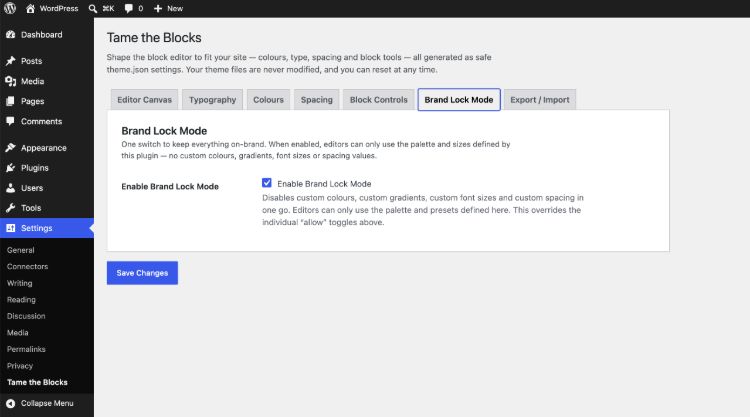
Brand Lock Mode
This is the big one.
Flip a single switch and editors are restricted to approved values only:
- No custom colours
- No arbitrary gradients
- No random font sizes
- No rogue spacing values
Presets only.
On-brand by default.
And for peace of mind, everything applies to the editor unless you deliberately switch on Apply to Frontend.
Experiment freely.
Your live site stays exactly as it is until you say otherwise.
The big idea: it never touches your theme
This is the bit I’m most pleased with.
Tame the Blocks doesn’t edit a single theme file.
Modern WordPress themes are powered by theme.json, the system that controls colours, typography, spacing, and which editor tools exist.
Instead of fighting that system, the plugin plugs directly into it.
Your settings become theme.json
Every setting you configure is transformed into a clean, spec-compliant theme.json structure behind the scenes.
WordPress merges it automatically
Using the core wp_theme_json_data_theme filter, WordPress layers your settings on top of the active theme’s own configuration.
Exactly as if the theme had shipped with those values from day one.
Editor-only settings stay editor-only
Canvas tweaks are injected through block_editor_settings_all, which reaches inside the editor iframe without leaking changes to the frontend.
Meaning:
Your writers get a better editing experience.
Your live site stays untouched.
Completely reversible
Because it uses WordPress filters, it’s completely reversible.
Deactivate the plugin and your site returns to exactly how it was.
Switch themes and your settings come with you.
There’s even a live theme.json preview with one-click copy, so if you ever want to bake your settings permanently into a theme, the JSON is sitting there waiting.
Who this is for
Agencies
Hand over sites to clients without wondering what creative interpretation of the brand guidelines they’ll invent next.
Marketing teams
Keep pages visually consistent across multiple editors, without needing someone to constantly tidy things up.
Publishers and content teams
Give writers a simpler, calmer editing experience with fewer distractions and fewer opportunities to accidentally break layouts.
Anyone tired of fighting the editor
If you’ve ever thought:
“Why can this block suddenly be neon green?”
This plugin is for you.
Why this matters
Brand consistency, enforced
Not a style guide PDF nobody reads.
Actual guardrails built into the editing UI.
Simpler editing
Fewer knobs.
Less confusion.
Fewer “why does this page suddenly look weird?” support tickets.
Safe by default
Frontend styling is off by default.
There’s a full reset button.
No theme files are edited.
Ever.
Portable
Export your setup as theme.json.
Import it on another project.
Your brand system becomes copy and paste.
Try it
Set your colours.
Choose your type scale.
Turn on Brand Lock Mode.
Then hand the editor to your team without worrying that the next page will come back in twelve different fonts and a mysterious shade of blue.
Make the WordPress editor behave.
Leave a Reply