
I didn’t set out to build a website. I set out to build a place to dump stuff.
You know the feeling. A link you want to remember. A screenshot you took at 1am. A half-formed thought. A PDF someone sent you. A tweet that made you laugh. Normally these things get scattered across bookmarks, Notes, Downloads, twelve open tabs, and the void. I wanted one place to throw them — fast, no filing, no folders required.
So I built Scrappy.World. (One of the 50+ things I’ve made with AI, but the one with the most unexpected ending.)
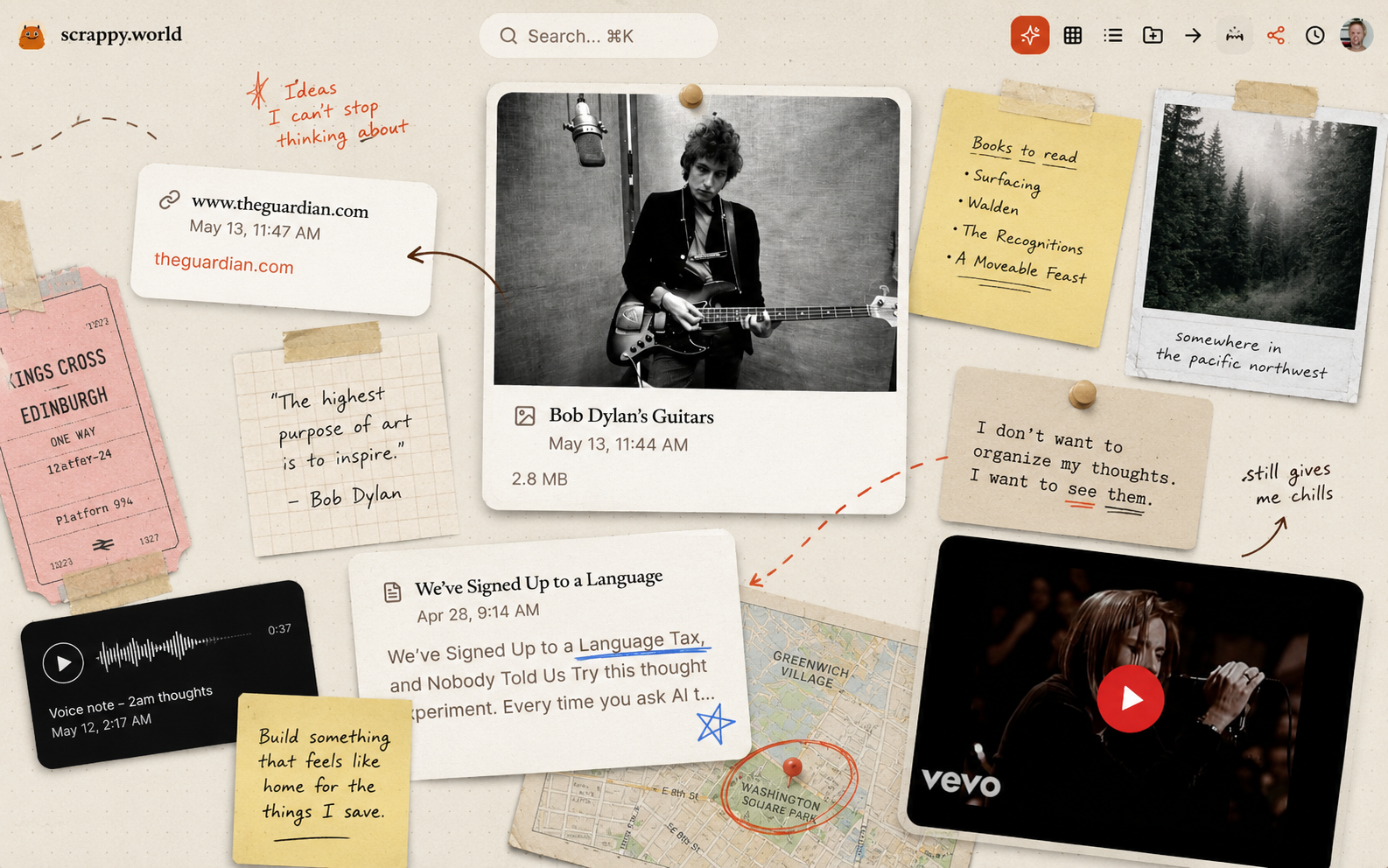
An infinite canvas you can drop anything onto.
What it actually does
It’s a spatial scrapbook. You open it up and you get a blank, zoomable, pannable canvas. Then:
Paste a link and it becomes a card with the page preview.
Drag a file in — image, PDF, video, whatever — it becomes a card.
Type a note and it becomes a sticky.
Drop a YouTube or Twitter URL and it embeds, playable in place.
Group things into folders — colored, tape-corner, slightly tilted, very analog-feeling. Drag a scrap onto one and it gulps it up with a confetti burst. Pull it back out with one click.
Pin the important stuff so it floats to the top.
Search across everything instantly.
Switch views — Canvas for the spatial mess, Grid for a tidy mosaic, List for skimming, and Magazine for an editorial front-page layout that makes your scraps look like a publication.
Browser extension so you can clip from anywhere on the web straight into your canvas.
Mobile-aware — it knows when you’re on your phone and switches to a sensible view.
There’s celebration animations when you drop things. There’s a “let go” button for stuff you want to release. The whole thing is built to feel less like a productivity tool and more like a desk you actually want to sit at.
That part — I expected. That’s what I was building.
The accident
Somewhere along the way I added a share button.
The idea was small: let people show their canvas to a friend. One toggle, public on, copy a link, done. The link goes to scrappy.world/c/yourslug and visitors see your canvas exactly as you left it — same zoom level, same pan position, same view mode you were in. They can pan around, zoom in, click into cards, watch the videos, read the notes, download the files. They just can’t change anything.
I shipped it. I sent my own link to someone. They scrolled around for a few minutes and said:
“wait — is this your website?”
And I sat with that for a second. Because… yeah. Kind of. It was.
What is a website, really
A website is a thing at a URL that other people can visit and look at. That’s basically the definition.
A normal website is a bunch of pages, with a nav bar, organized hierarchically, made by someone who decided what should go where. You read it top to bottom, click links, follow a path the author laid out for you.
A shared Scrappy canvas is none of that. It’s a space. You land on it and you’re somewhere — there’s a hero scrap front and center where the owner left their viewport, and around it, in every direction, is everything else they cared enough to drop in. Notes next to videos next to half-finished thoughts next to the PDF that changed how they think about something.
You don’t read it. You wander it. You zoom out to see the shape of someone’s interests. You zoom in on the corner that looks interesting. You find things they probably forgot were even there.
It’s a homepage that’s actually a home — the room someone lives in, not the lobby they built for visitors.
Why this is new (I think)
We have personal websites. We have blogs. We have link-in-bio pages. We have Notion publics, Are.na channels, Pinterest boards, Tumblrs. Each one is a format with rules — a feed, a list, a grid, a tree.
A Scrappy canvas has no format. It’s whatever shape the person made. Some are tidy mood boards. Some are chaotic. Some are basically a magazine. Some are a single giant note surrounded by supporting evidence. The container doesn’t impose anything.
And because the making tool is a low-friction dumping ground, the published version stays alive in a way that maintained websites don’t. You don’t sit down to “update your site.” You just keep dropping scraps into your day, and your public canvas updates itself. The website is a side effect of you using your own tool.
That’s the bit I didn’t see coming. I built a place for me to put things. By making it shareable, I accidentally made a new kind of homepage — one that’s spatial instead of sequential, alive instead of curated, and shaped like the person who made it instead of the template they picked.
Try it
Go to scrappy.world. Drop some stuff in. Flip the share toggle. Send the link to one person.
See what they say.


Leave a Reply